The Luminometer Standardization Kit (LSK) is a linearity check for your luminometer. Making sure that the luminometer produces a linear response is central to Luminultra’s product advantage of providing true total biomass concentrations rather than simply a generic machine output.
Key terms
ATP: Adenosine triphosphate, energy molecule of living cells.
RLU: Relative Light Units, the measurement of luminescence.
Run this test with the Relay™ app
Relay™ is your tool to easily calculate, organize, and share results. Access is included with your purchase.
If you are new to Relay™, follow the guides to first create a site and sample location.
Connect to your luminometer, then select RUN TESTS to begin a new test.
As you work through these test kit instructions, you can initiate RLU readings directly within Relay™ by selecting READ on any input. Once all inputs are entered, your results will automatically calculate.
1.2 Rehydrate the Luminase enzyme
Gently mix the Buffer and Luminase enzyme.
Wait 5 minutes for solution to dissolve.
After rehydration, keep Luminase refrigerated or frozen; it stays effective for 2–4 weeks at 4°C (39°F) or 3–6 months when frozen between uses. Before testing, let it thaw and reach room temperature (takes about 1 hour). Do not apply direct heat to warm it faster. For more details, visit my.luminultra.com.
1.3 Preparation
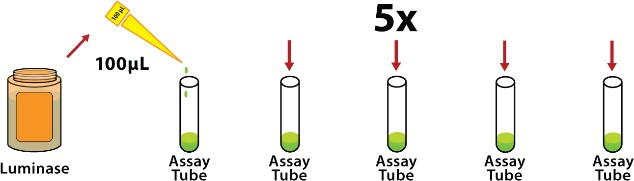
Use a new pipet tip to dispense 100µL of Luminase enzyme into each of the 5 new 12x55mm test tubes.
2. Measure ATP standards
UltraCheck 0.01
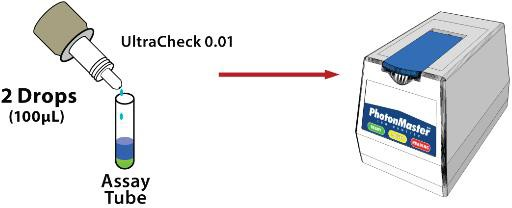
Add 2 drops (100µL) of UltraCheck 0.01 to the first prepared test tube.
Swirl the tube, place it in the luminometer, and take the UltraCheck 0.01 RLU reading (select READ) within 10 seconds.
UltraCheck 0.1
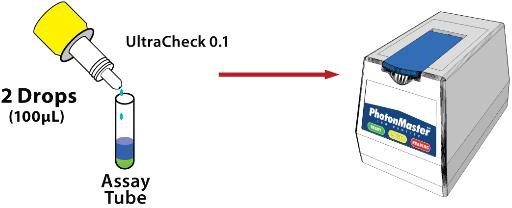
Add 2 drops (100µL) of UltraCheck 0.1 to the second prepared test tube.
Swirl the tube, place it in the luminometer, and take the UltraCheck 0.1 RLU reading (select READ) within 10 seconds.
UltraCheck 1
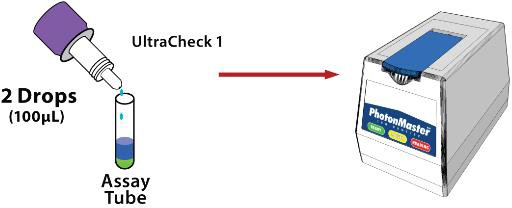
Add 2 drops (100µL) of UltraCheck 1 to the third prepared test tube.
Swirl the tube, place it in the luminometer, and take the UltraCheck 1 RLU reading (select READ) within 10 seconds.
UltraCheck 10
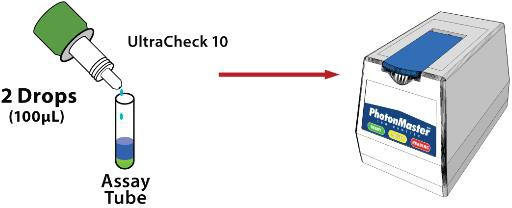
Add 2 drops (100µL) of UltraCheck 10 to the fourth prepared test tube.
Swirl the tube, place it in the luminometer, and take the UltraCheck 10 RLU reading (select READ) within 10 seconds.
UltraCheck 100
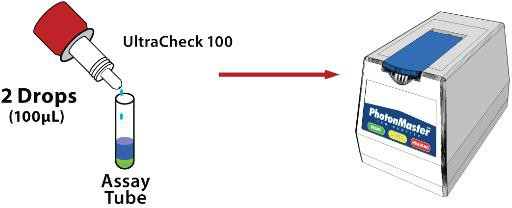
Add 2 drops (100µL) of UltraCheck 100 to the fifth prepared test tube.
Swirl the tube, place it in the luminometer, and take the UltraCheck 100 RLU reading (select READ) within 10 seconds.
3. Analysis
Calculations
Tip: Relay™ does the work For you
When all inputs are entered in Relay’sRun tests workflow, the results will calculate automatically. Select Save Test to catalog and share your results with your team.
In Relay™, confirm that the calculated R2 value is greater than 0.99 for good linearity.
If using Excel, generate a log-log graph with the obtained RLU values on the y-axis and the UltraCheck concentrations on the x-axis. Calculate R2 and confirm >0.99.
Data Interpretation Guidelines
Since Luminultra’s test kits use a single-point standardization (using only UltraCheck 1), a linear response is necessary. An R2 of 0.99 or greater is considered an acceptable result.
Ensure reagents are not expired (expiry information can be found on reagent vials). Ensure reagents are being stored properly (storage information can be found on reagent vials)
Background readings are higher than expected
Check if your Luminometer needs to be cleaned. Quarterly cleaning (LCK) and annual linearity verification (LSK) is recommended. Cleaning and maintenance kits are available for purchase from Luminultra.