
Product overview
The Bugcount® One ATP Analyzer is a compact, high-performance luminometer that measures microbial activity in real time using ATP (Adenosine Triphosphate) testing.
ATP analysis uses a natural bioluminescent reaction to detect ATP—an energy-carrying molecule present in all living organisms. The light produced in this reaction is directly proportional to the concentration of microorganisms in the sample, measured precisely by a luminometer.
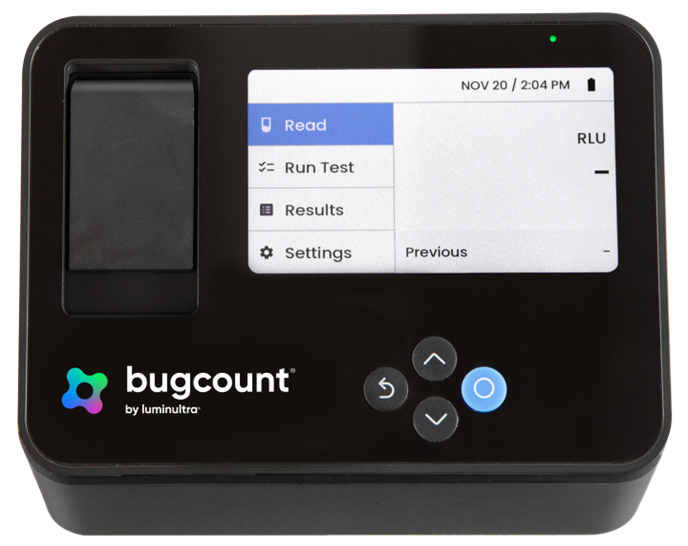
Luminultra’s Bugcount® analyzer delivers this precision with portability and ease of use. When connected to a device running Luminultra’s Relay™ software, users gain expanded tools for data management, analysis and collaboration.
Paired with Luminultra ATP test kits, the Bugcount® analyzer provides a complete solution for:
- Fast, on-site microbial testing
- Quantifying total microorganism concentration
- Proactive microbial monitoring and process control
From industrial facilities to water utilities and environmental monitoring, the Bugcount® analyzer delivers reliable, actionable results in minutes.
What’s included
Your Bugcount® One ATP Analyzer kit includes all the essential components for field or laboratory ATP testing, housed in a rugged hard-shell case for secure storage and transport.
Kit Contents
- Bugcount® One ATP Analyzer
- Test tube rack
- USB-C charging cable and wall adapter
- Micropipettors: 100µL, 300µL, 1000µL
- Hard-shell carrying case
Pair your Bugcount analyzer with Relay™
The Bugcount® analyzer can be used as a standalone device, but for the best experience—including enhanced data logging, result interpretation, integrated support, and team collaboration — we recommend pairing it with the Relay™ software.
Access to Relay™ is included with your equipment purchase.
Login: https://relay.luminultra.com
Safety and compliance information
The Bugcount® One ATP Analyzer meets the following regulatory standards:
- CE – Conforms to European safety, health, and environmental requirements
- FCC – Complies with electromagnetic interference limits in the US
- RCM – Certified for use in Australia and New Zealand
- The Bugcount® analyzer Is rated for use In a Pollution Degree 2 environment, as defined in IEC 61010-1
For detailed compliance documentation, including the Declaration of Conformity, please refer to the label on the underside of the device or contact Luminultra directly.
Safety symbols used in this manual
 | Electrical shock hazard Risk of electric shock if misused |
 | Fire hazard Risk of smoke emission or fire |
 | Explosive hazard Risk of explosion under certain conditions |
 | General warning Indicates safety instructions or potential hazards. Read all accompanying documentation before use. |
General safety precautions
| If you notice smoke or a burning odor, immediately stop using the device. Allow the unit to cool down, then contact Luminultra or an authorized dealer. Do not attempt to repair the device yourself. Do not operate the device near flammable gases or vapors. The presence of such substances may result in an explosion This unit contains high internal voltages, so improper handling may cause electrical shock, fire, or abnormal operation. |
| Do not open or disassemble the device. It contains high-voltage components that can cause electrical shock or fire. Servicing should be performed only by Luminultra-qualified personnel. Use the supplied power adapter and charging cable only. Unauthorized accessories may pose safety risks or damage the device. |
| Indicates important safety instructions or potential hazards. Read all accompanying documentation before use. |
Product specifications
| Linear dynamic range: | 4 x 10-12 to 1 x 10⁻⁶M ATP |
| Linear dynamic range: | 0 to 10,000,000 RLU |
| Assay tube chamber: | Ø12 x 55mm |
| Detector: | Photomultiplier tube (PMT) |
| Dimensions: | 167W x 115D x 94H mm |
| Weight: | 2.4lbs (1088g) |
| Storage temperature: | -10 to +50°C |
| Operating temperature: | +5 to +35°C |
| Battery: | 7800 mAh lithium-ion |
| PC/power USB connection: | USB-C (5V, 3A max input) |
| Control methods: | Onboard, USB-to-PC |
| Memory: | 10,000 sample points |
| Maximum rated operating altitude: | 2000m |
| Rated operating humidity range: | 10–85% RH |
Usage Notes
- The Bugcount® analyzer is a sensitive laboratory device. While built for field use, it should always be handled with care.
- Avoid operating the unit in extreme temperatures, direct sunlight or conditions that could cause physical shock.
- We recommend keeping the analyzer in its supplied field case at all times, especially during transport.
- Use of the equipment in a manner not specified by the manufacturer may impair the protection provided by the equipment.
Charging & connection instructions
The Bugcount® analyzer is powered by a high-capacity lithium-ion battery, capable of delivering over 100 readings on a single charge. It uses a USB-C port for both charging and data transfer.
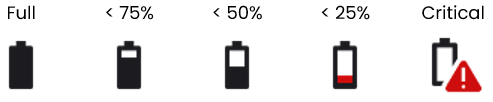
The device uses an LED and an on-screen battery icon to indicate power and charging status. The LED is positioned above the display, and signals device status during operation. The on-screen battery icon provides a real-time view of remaining power.
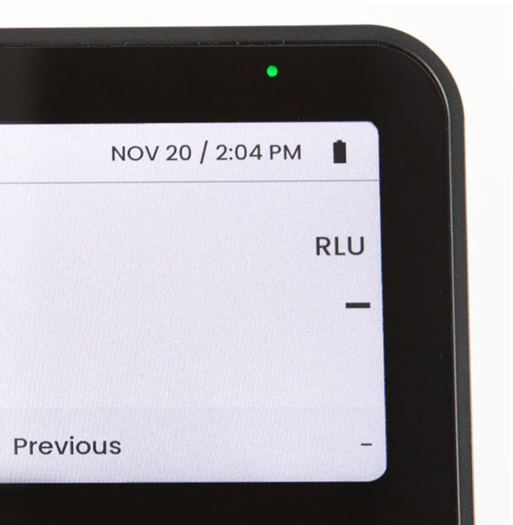
LED status indicator
| LED state | Meaning |
|---|---|
| Off | Device off |
| Solid green | Device on |
| Blinking green | Device on and charging |
| Solid red | Device off and charging |
| Blinking red | Charging fault |
| Solid purple | Updating firmware |
On-screen battery life icons
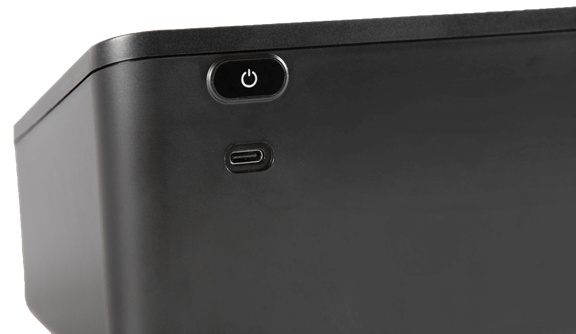
To charge the device:
- Connect the supplied USB-C cable to the port on the back of the device.
- Plug the other end into a USB wall adapter (5V, 3A recommended) or a computer USB port.
For best battery longevity:
- Avoid leaving the device plugged in continuously.
- Charge before long-term storage.
- Do not store at low battery levels.
User interface
The Bugcount® analyzer features an intuitive user interface controlled via four physical buttons arranged beneath the display. Each button corresponds to directional navigation and menu control on the screen.
Button control
 | Selects highlighted item on display, enters value |
 | Moves highlighted area up, increases value |
 | Moves highlighted area down, decreases value |
 | Return to previous screen |
The main menu shows the device’s four primary functions:
- Read: Allows the user to perform a quick, standalone RLU (Relative Light Unit) measurement. When selected, the device begins a 10-second reading cycle, displays the resulting RLU value, and stores the value in the Results.
- Run Test: Provides a list of supported Luminultra test kits. Selecting a kit launches a step-by-step workflow specific to that test protocol.
- Results: Display all stored results from both Read and Run Test functions. Users can scroll through past measurements, view timestamps and details, and delete individual entries as needed.
- Settings:
- Set date and time
- Delete all stored results
- Adjust brightness
- Enable or disable audio
- View system information
Preventative maintenance overview
Routine preventative maintenance is essential to maintaining measurement accuracy and reliable performance of the Bugcount® One ATP Analyzer. Luminultra recommends a simple, scheduled maintenance approach focused on periodic replacement of the removable sample chamber.
Following this maintenance schedule helps preserve analyzer accuracy, minimizes factors that can affect measurement performance, and supports warranty coverage.
Six-month maintenance routine
As part of normal operation, customers should plan to replace the sample chamber approximately every six months using the Bugcount® One ATP Analyzer Maintenance Kit, sold separately. Replacement ensures consistent performance and accurate results.
Spills and contamination guidance
- If a spill or contamination occurs inside the sample chamber, the chamber should be replaced.
- Sample chambers are not intended to be cleaned and reused after a spill.
- If liquid enters the device cavity beneath the sample chamber, do not attempt to clean inside the analyzer. Contact Customer Support.
Optional annual performance verification
Some customers choose to also verify analyzer linearity approximately once per year to confirm that readings remain within expected performance tolerances. This is performed using the Luminometer Standardization Kit (LSK), which is sold separately.
Linearity verification is not required for routine operation but may be appropriate for customers operating in regulated environments or performing internal audits.
Sample chamber replacement procedure
- Turn off the Bugcount® analyzer.
- Open the lid to the assay chamber and remove the assay tube.
- Lift the front overhang of the chamber insert and remove it from the analyzer.
- Replace the chamber with a new, clean one from the Bugcount® One ATP Analyzer Maintenance Kit. Push down until the chamber is firmly seated.
- Close the chamber door and power the analyzer back on to continue testing.
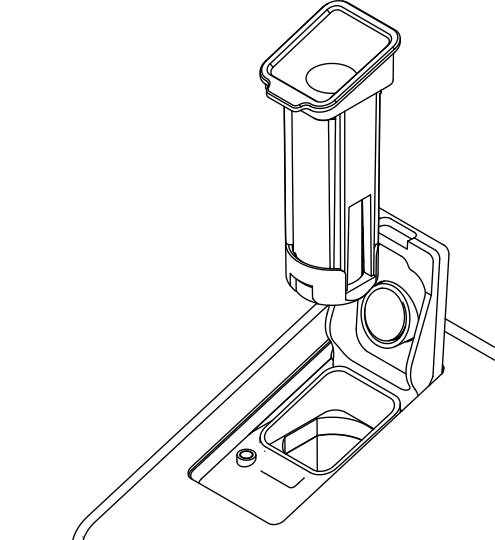
Power off the device and avoid bright lights when changing the chamber. This may result in a 24-hour period of elevated RLU readings.
Surface cleaning
To clean the outer surfaces of the device:
- Gently wipe the housing, screen, and buttons with a lint-free cloth lightly dampened with water or a mild cleaning solution.
- Avoid getting moisture into the USB-C port, button seams, or the chamber opening.
- Do not submerge the device or expose it to excessive liquid.
Important: Never use sharp or abrasive materials on any part of the Bugcount® analyzer. Doing so may damage the device and void warranty coverage.
Handling instructions
- Keep the analyzer steady. Place the unit on a level surface and avoid moving or tilting it during measurement to prevent data fluctuations.
- Remove the test tube after each test. This prevents spills that could damage the Bugcount® analyzer internally.
- Maintain distance from interference sources. Keep the analyzer at least 10cm away from stirrers, mixers or other equipment that generates electromagnetic noise.
- Protect from liquids and solvents. Do not expose the unit to liquids, reagents or organic solvents, as this can cause malfunction or damage. If exposure occurs, wipe immediately with a clean, dry cloth.
- Operate in stable environments. Avoid locations with rapid temperature changes, steam, heavy condensation, corrosive gases, vibration, intense magnetic fields, or excessive dust and debris.
- Maintain cleanliness. Wash hands thoroughly before handling—ATP contamination from touch can affect results.
- Handle with care. Place the unit on a stable surface and avoid shocks, drops or other physical impacts that could cause permanent damage.
- Prevent static buildup. Avoid electrostatic charge on the sample tube, as static can skew measurement data.
- Avoid water exposure. The Bugcount® analyzer is not waterproof. Do not submerge or expose it to excessive moisture to prevent internal shorting or damage.
- Recycle responsibly. To return a used analyzer for recycling, contact us at my.luminultra.com with the unit’s serial number and purchase date. A representative will provide next steps within 1–2 business days. Please do not ship devices without prior authorization.
Waste Electrical and Electronic Equipment (WEEE)
This device is subject to WEEE requirements and must not be disassembled by the user for safety reasons. At end of life, see the web page below for recycling instructions.

Warranty information
For warranty terms, see the physical user manual included with your equipment set.
Warranty registration
Customers are encouraged to register their instrument in Relay™ at relay.luminultra.com. Warranty registration helps ensure accurate product records, faster support, and streamlined warranty service, but is not required to obtain warranty coverage.
Support
Support site: my.luminultra.com
Run tests with Relay™ : relay.luminultra.com
Ordering: orders@luminultra.com
Telephone: +1 888 389 4491
Contact Luminultra
Luminultra Technologies Ltd.
819 Royal Road Building B
Fredericton, NB, Canada, E3G 6M1
Luminultra Technologies Inc.
805 Pinnacle Dr, Suite M
Linthicum Heights, MD, USA, 21090
Luminultra Technologies SAS
Paris Montparnasse Business Centre
140 bis rue de Rennes,75006 Paris
All trademarks are the property of Luminultra Technologies Ltd.